
 [Posting] 10. DB 연결 및 뷰 파일 분할
이제 포스트 작성 및 저장을 위해 코드이그나이터와 DB와의 연결 설정과
파일 관리 편의를 위해 뷰 파일을 공통되는 영역별로 분할하겠습니다.
DB 연결 설정
STEP 1) DB 처리를 위해 앞서 설치한 MySQL Server와 CodeIgniter 3의 연결을 설정합니다.
- ~/application/config/database.php 에 'default' 연결 설정 아래에 'db' 연결 설정 내용 추가
|
1
2
3
4
5
6
7
8
9
10
11
12
13
14
15
16
17
18
19
20
21
22
23
24
25
26
27
28
29
30
31
32
33
34
35
36
37
38
39
40
41
42
43
44
45
46
47
|
<?
...(생략)
$active_group = 'db'; // 추가한 연결 설정 이름으로 변경
$query_builder = TRUE;
$db['default'] = array(
'dsn' => '',
'hostname' => 'localhost',
'username' => '',
'password' => '',
'database' => '',
'dbdriver' => 'mysqli',
'dbprefix' => '',
'pconnect' => FALSE,
'db_debug' => (ENVIRONMENT !== 'production'),
'cache_on' => FALSE,
'cachedir' => '',
'char_set' => 'utf8',
'dbcollat' => 'utf8_general_ci',
'swap_pre' => '',
'encrypt' => FALSE,
'compress' => FALSE,
'stricton' => FALSE,
'failover' => array(),
'save_queries' => TRUE
);
// local pc
$db['db'] = array(
'dsn' => '',
'hostname' => 'localhost:3306',
'username' => 'myblog',
'password' => '(계정 생성 시 설정한 비밀번호)',
'database' => 'myblog',
'dbdriver' => 'mysqli',
'dbprefix' => '',
'pconnect' => FALSE,
'db_debug' => (ENVIRONMENT !== 'production'),
'cache_on' => FALSE,
'cachedir' => '',
'char_set' => 'utf8',
'dbcollat' => 'utf8_general_ci',
'swap_pre' => '',
'encrypt' => FALSE,
'compress' => FALSE,
'stricton' => FALSE,
'failover' => array(),
'save_queries' => TRUE
);
|
cs |
STEP 2) DB 연결을 확인합니다.
-
모델 파일을 생성하여 DB 테스트 함수 작성
-
~/application/models/Home_model.php 파일 생성하여 아래와 같이 코드 추가
|
1
2
3
4
5
6
7
8
9
10
11
12
13
14
15
16
17
18
19
20
21
22
|
<?php
defined('BASEPATH') OR exit('No direct script access allowed');
class Home_model extends CI_Model {
function __construct() {
parent::__construct();
$this->db = $this->load->database('db', true);
}
public function test()
{
try {
$this->db;
$result = 'DB 연결에 성공했습니다.';
}catch(Exception $e){
$result = $e->getMessage();
}
return $result;
}
}
|
cs |
-
컨트롤러에서 테스트 결과 데이터를 뷰로 넘겨 주는 코드 추가
- ~/application/controllers/Home.php 파일에 아래와 같이 코드 추가
|
1
2
3
4
5
6
7
8
9
10
11
12
13
14
15
16
17
18
19
|
<?php
defined('BASEPATH') OR exit('No direct script access allowed');
class Home extends CI_Controller {
function __construct() {
parent::__construct();
$this->load->model('Home_model', 'home');
$this->load->helper(array('form', 'url','text'));
$this->load->library(array('form_validation', 'session'));
}
public function index()
{
$data = array(
'result' => $this->home->test()
);
$this->load->view('home',$data);
}
}
|
cs |
-
뷰에 해당 결과 데이터 출력 코드 추가
-
~/application/views/home.php 파일에 아래와 같이 코드 추가
|
1
2
3
4
5
6
7
8
9
10
11
12
13
14
15
|
...(생략)
<div class="col-10">
<span class="text-primary"><?= $result ?></span>
<div class="input-group mb-3">
<span class="input-group-text" id="inputGroup-sizing-default">제목</span>
<input type="text" class="form-control" aria-label="Sizing example input" aria-describedby="inputGroup-sizing-default">
</div>
<div class="mb-3">
<textarea id="content" style="display:none;"></textarea>
</div>
<div>
<button type="button" class="btn btn-outline-secondary">포스트 저장</button>
</div>
<div>
(생략)...
|
cs |
-
블로그에 접속하여 결과 데이터 내용 확인
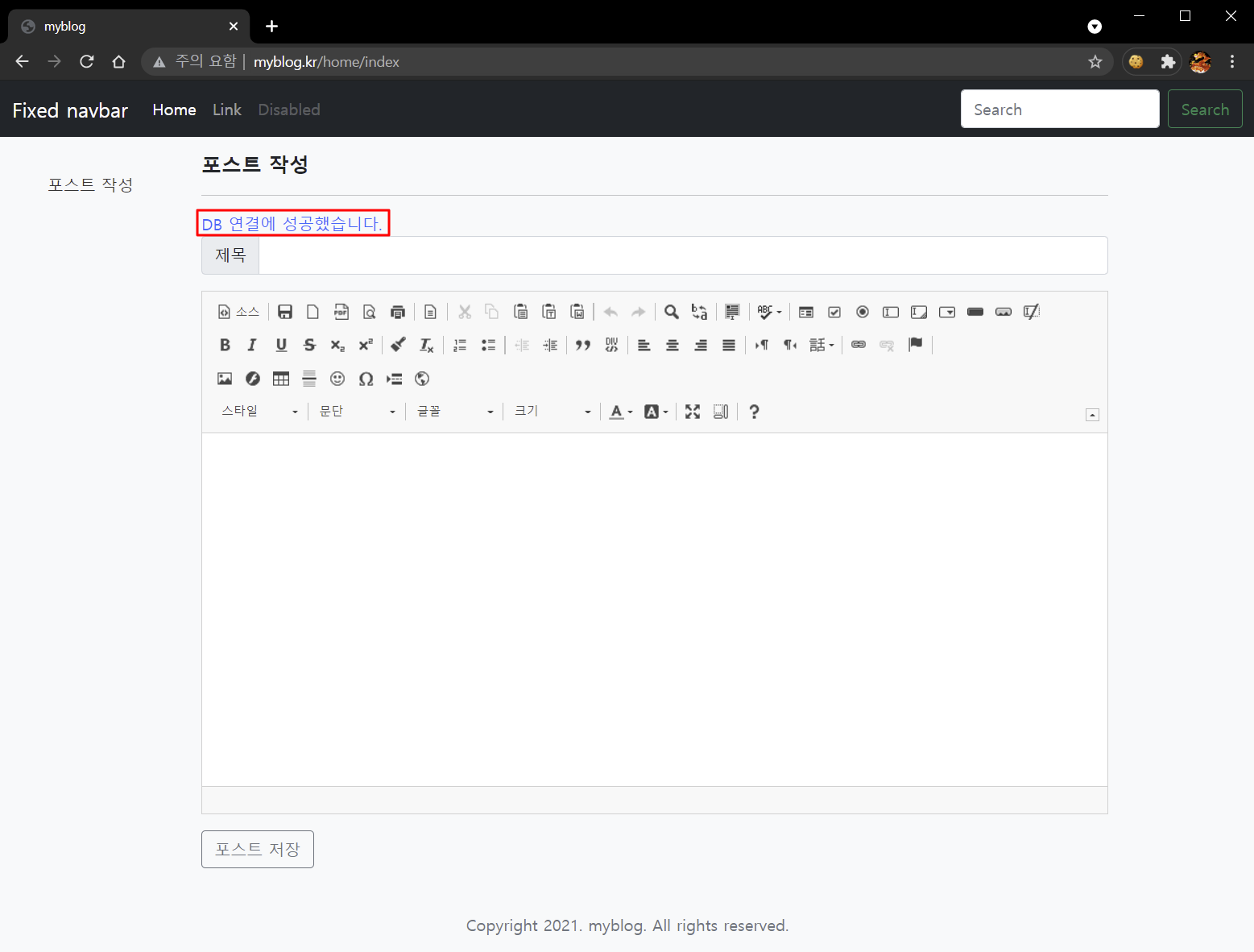
DB 연결 설정이 완료되었습니다.
뷰 파일을 공통적으로 적용되는 영역을 기준으로 분할하면 새로운 뷰 파일 생성 시,
필요한 영역의 내용만 코딩하면 되기 때문에 작업 시간을 단축할 수 있고 관리도 용이해집니다.
뷰 파일 분할
STEP 1) 공통 적용 영역별로 파일을 생성합니다.
본 프로젝트는 공통적으로 적용되는 세가지 영역과 각 기능별 본문 코드로 파일을 분할하였습니다.
아래에는 공통적으로 적용되는 세가지 영역의 코드 내용입니다.
-
~/application/views/template/header.php => <head> tag의 내용
|
1
2
3
4
5
6
7
8
9
10
11
12
13
14
15
16
17
18
19
20
21
22
23
24
25
26
27
28
29
30
31
32
33
34
35
36
37
38
39
40
41
42
43
44
45
46
47
48
49
50
51
52
53
54
55
56
57
58
59
60
61
62
63
64
65
66
67
68
69
70
71
|
<!DOCTYPE html>
<html lang="ko" class="h-100">
<head>
<meta charset="utf-8">
<meta name="viewport" content="width=device-width,initial-scale=1">
<meta name="description" content="">
<meta name="author" content="Mark Otto, Jacob Thornton, and Bootstrap contributors">
<title>myblog</title>
<!-- Bootstrap CSS -->
<!-- CSS only -->
<link rel="stylesheet" type="text/css" href="/css/bootstrap.min.css">
<!-- jQuery & Bootstrap JS -->
<script
src="https://code.jquery.com/jquery-3.6.0.js"
integrity="sha256-H+K7U5CnXl1h5ywQfKtSj8PCmoN9aaq30gDh27Xc0jk="
crossorigin="anonymous">
</script>
<script src="/js/sidebars.js"></script> <!-- 사이드 메뉴 관련 자바스크립트 -->
<!-- Option 1: Bootstrap Bundle with Popper -->
<script src="https://cdn.jsdelivr.net/npm/bootstrap@5.0.0-beta3/dist/js/bootstrap.bundle.min.js" integrity="sha384-JEW9xMcG8R+pH31jmWH6WWP0WintQrMb4s7ZOdauHnUtxwoG2vI5DkLtS3qm9Ekf" crossorigin="anonymous"></script>
<!-- ckeditor 4 -->
<script src="/js/lib/ckeditor/ckeditor.js"></script>
<!-- ckfinder 3 -->
<script src="/js/lib/ckfinder/ckfinder.js"></script>
<style>
.bd-placeholder-img {
font-size: 1.125rem;
text-anchor: middle;
-webkit-user-select: none;
-moz-user-select: none;
user-select: none;
}
@media (min-width: 768px) {
.bd-placeholder-img-lg {
font-size: 3.5rem;
}
}
.sidebar-sticky {
position: relative;
top: 0;
padding-top: .5rem;
overflow-x: hidden;
overflow-y: auto; /* Scrollable contents if viewport is shorter than content. */
}
.sidebar-sticky .nav-link {
font-weight: 500;
color: #333;
}
.sidebar-sticky .nav-link .feather {
margin-right: 4px;
color: #727272;
}
.sidebar-sticky .nav-link.active {
color: #007bff;
}
</style>
<!-- theme CSS -->
<link rel="stylesheet" type="text/css" href="/css/sticky-footer-navbar.css">
<link rel="stylesheet" type="text/css" href="/css/sidebars.css">
</head>
|
cs |
-
~/application/views/template/head_nav.php => 상단 메뉴 및 사이드 메뉴 영역의 내용
|
1
2
3
4
5
6
7
8
9
10
11
12
13
14
15
16
17
18
19
20
21
22
23
24
25
26
27
28
29
30
31
32
33
34
35
36
37
38
39
40
41
42
43
44
45
46
47
48
49
|
<body class="d-flex flex-column bg-light h-100">
<header>
<!-- Fixed navbar -->
<nav class="navbar navbar-expand-md navbar-dark fixed-top bg-dark">
<div class="container-fluid">
<a class="navbar-brand" href="#">Fixed navbar</a>
<button class="navbar-toggler" type="button" data-bs-toggle="collapse" data-bs-target="#navbarCollapse" aria-controls="navbarCollapse" aria-expanded="false" aria-label="Toggle-navigation">
<span class="navbar-toggler-icon"></span>
</button>
<div class="collapse navbar-collapse" id="navbarCollapse">
<ul class="navbar-nav me-auto mb-2 mb-md-0">
<li class="nav-item">
<a class="nav-link active" aria-current="page" href="#">Home</a>
</li>
<li class="nav-item">
<a class="nav-link" href="#">Link</a>
</li>
<li class="nav-item">
<a class="nav-link disabled" href="#" tabindex="-1" aria-disabled="true">Disabled</a>
</li>
</ul>
<form class="d-flex">
<input class="form-control me-2" type="search" placeholder="Search" aria-label="Search">
<button class="btn btn-outline-success" type="submit">Search</button>
</form>
</div>
</div>
</nav>
</header>
<!-- Begin page content -->
<main class="flex-shrink-0">
<div class="container row">
<div id="sidebarMenu" class="sidebar-sticky col-sm-12 col-lg-2 d-lg-block bg-light collapse" >
<div class="col-2 d-flex flex-column p-3 bg-light" style="width: 280px; height:100%;">
<ul class="nav nav-pills flex-column mb-auto">
<li class="nav-item">
<a href="/home/index" class="nav-link">
포스트 작성
</a>
</li>
<li class="nav-item">
<a href="/home/list" class="nav-link">
포스트 목록
</a>
</li>
</ul>
</div>
</div>
|
cs |
-
~/application/views/template/footer.php => 하단 푸터 영역
|
1
2
3
4
5
6
7
8
9
|
</div>
</main>
<footer class="footer mt-auto py-3 bg-light">
<div class="container text-center">
<span class="text-muted">Copyright 2021. myblog. All rights reserved.</span>
</div>
</footer>
</body>
</html>
|
cs |
위와 같이 분할한 파일들은 새로운 뷰 파일 생성 시 영역별로 파일을 읽어오는 코드를 추가하여 사용할 수 있습니다.
이후 진행 단계에서는 위의 파일들을 읽어오는 코드를 추가하여 뷰 파일을 작성하겠습니다.
예시)
-
~/application/views/home.php
|
1
2
3
4
5
6
7
8
9
10
11
12
13
14
15
16
17
18
19
20
21
22
23
24
25
26
27
28
29
30
|
<?php
defined('BASEPATH') OR exit('No direct script access allowed');
require_once($_SERVER['DOCUMENT_ROOT'].'/application/views/template/header.php');
require_once($_SERVER['DOCUMENT_ROOT'].'/application/views/template/head_nav.php');
?>
<!-- main content -->
<div class="col-sm-12 col-lg-10">
<?= $this->session->flashdata('message') ?>
<div class="pt-2 fs-5 fw-bold">
<span class="">포스트 작성</span>
</div>
<hr>
<form action="home/save" enctype="multipart/form-data" method="post" accept-charset="utf-8">
<!-- <span class="text-primary"><?= $result ?></span> -->
<div class="input-group mb-3">
<span class="input-group-text">제목</span>
<input type="text" class="form-control" aria-label="Sizing example input" aria-describedby="title" id="title" name="title" value="<?= $title ?>">
</div>
<div class="mb-3">
<textarea id="content" name="content" style="display:none;" value="<?= $content?>"></textarea>
</div>
<div>
<button type="submit" class="btn btn-outline-secondary">포스트 저장</button>
</div>
</form>
</div>
<!-- end of main content -->
<?
require_once($_SERVER['DOCUMENT_ROOT'].'/application/views/template/footer.php');
?>
|
cs |


관련 포스트 목록
- [Server] 01. 개요 및 웹 서버 설치
- [Server] 02. PHP 7 설치 및 웹 서버 연동
- [DataBase] 03. DB Server(MySQL 8.x) 설치
- [Framework] 04. CodeIgniter 3.x 설치 및 index.php 안보이게 하기
- [Stylesheet] 05. Bootstrap 5 설치
- [Stylesheet] 06. Bootstrap 5 example template 적용하기
- [Library] 07. 온라인 html 편집툴(CKEditor 4) 설치 및 초기화
- [Library] 08. 파일 관리툴 CKFinder 설치 및 초기화
- [DataBase] 09. 블로그 DB 생성 및 HeidiSQL 설치
- [Posting] 10. DB 연결 및 뷰 파일 분할
- [Posting] 11. 포스트 저장 기능 구현
- [Posting] 12. 포스트 목록 뷰 생성 및 pagination 기능 구현
- [Posting] 13. 포스트 편집 기능 구현